Font Finder Copy Paste: Instantly Identify Fonts From Any Image
Font finder copy paste helps you identify fonts from images instantly using AI-powered matching and smart text detection.
A font finder copy paste tool helps you identify fonts from screenshots, logos, PDFs, or social media images by uploading the image and extracting the closest matching typeface instantly. Instead of manually searching through thousands of fonts, AI analyzes the shapes, spacing, and letterforms for you.
There’s a strangely frustrating moment that almost every designer, marketer, student, or curious internet person eventually runs into.
You see a font you love somewhere online. Maybe it’s on a YouTube thumbnail. Maybe it’s hidden inside a vintage album cover. Maybe it’s sitting quietly on a café menu screenshot you took three weeks ago because “that typography feels expensive somehow.”
And then the spiral begins.
You zoom in. You squint at the lowercase “a.” You open twenty tabs. You type things like “rounded futuristic font with soft edges.” Nothing matches. Every font starts looking emotionally identical after the fifteenth search result.
That’s where the idea behind font finder copy paste suddenly becomes less of a convenience and more of a rescue mission.
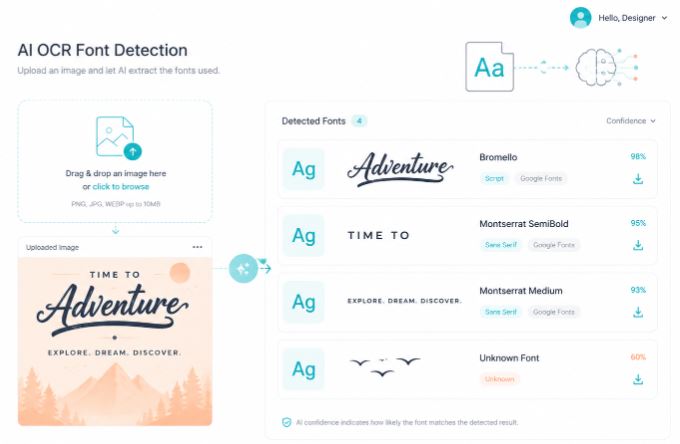
Instead of describing a font with vague human language, you simply upload the image. The system reads the typography directly from the pixels themselves. Shapes become data. Curves become clues. The guessing disappears.
That shift matters more than it sounds.
Because fonts are rarely just fonts anymore. They carry mood. Credibility. Era. Personality. A font can make a startup feel trustworthy or make a wedding invitation feel cold without anyone consciously noticing why.
And honestly, most people don’t want a lecture about typography theory. They just want to find the font quickly and move on with their project.
That’s exactly why tools like Find Font AI exist.
What Does “Font Finder Copy Paste” Actually Mean?
At first glance, the phrase sounds slightly confusing. Copy. Paste. Fonts. Images. It almost feels like three different ideas stitched together.
But the real intent behind font finder copy paste is surprisingly practical.
People want to:
- Identify a font from an image
- Copy the detected text quickly
- Find matching or similar fonts instantly
- Reuse the typography in their own work
The “copy paste” part often reflects urgency. Someone is usually working on something real.
A presentation due in two hours.
A client requesting “the same font as the reference image.”
A content creator trying to recreate a viral aesthetic.
A student rebuilding a scanned document.
The search is rarely academic. It’s usually emotional and time-sensitive.
Typography research has consistently shown that visual readability and font familiarity significantly influence trust and comprehension in digital environments.
That explains why people obsess over getting the font exactly right. The wrong font changes the feeling completely.
Why Humans Are Surprisingly Bad at Identifying Fonts
This part became obvious the first time I tried identifying a font from a blurry Instagram story screenshot.
I thought I knew typography reasonably well.
I did not.
Fonts are deceptive because small details create massive differences. One serif angle changes everything. One curved tail turns a geometric sans-serif into an entirely different family.
To most people, fonts look “close enough.”
To design systems, they are worlds apart.
The Brain Recognizes Mood Before Structure
Humans process typography emotionally before analytically.
That means we usually notice:
- Elegant
- Aggressive
- Minimal
- Luxury
- Retro
- Futuristic
Before we notice:
- x-height
- kerning
- aperture
- stroke contrast
This is why manual font searching becomes exhausting. You’re translating visual emotion into technical language.
AI doesn’t struggle with that translation problem.
It reads the structure directly.
How Font Finder Copy Paste Works
Modern font identification tools rely on image analysis and machine learning instead of keyword guessing.
The workflow feels almost suspiciously simple now.
Step 1: Upload the Image
You upload:
- Screenshots
- Logos
- Posters
- PDFs
- Social media graphics
- Website captures
- Scanned documents
Even imperfect images often work surprisingly well.
Step 2: AI Detects Text Regions
The system isolates actual typography from background clutter.
That matters because most images are messy:
- Shadows
- Gradients
- Compression artifacts
- Overlapping elements
- Low resolution
Good font detection depends on separating text from noise.
Step 3: Letterforms Are Analyzed
This is where things get interesting.
The tool compares:
- Character proportions
- Stroke width
- Corner shapes
- Spacing
- Curvature
- Glyph structure
Tiny details become fingerprints.
Step 4: Closest Font Matches Appear
Instead of one random guess, strong systems provide:
- Exact matches
- Similar alternatives
- Closest free fonts
- Commercial lookalikes
That last part matters more than people expect.
Sometimes you don’t need the exact font. You need the same emotional atmosphere.
Why Uploading an Image Beats Manual Font Searching

There’s something oddly outdated about trying to describe fonts with words.
Imagine describing a song by saying:
“It’s kind of emotional but also electronic with cinematic energy.”
That’s basically how traditional font searching works.
Upload-based font finding skips the interpretation layer completely.
Manual Searching Creates Decision Fatigue
Here’s what usually happens manually:
- You search “clean modern font”
- You open 40 tabs
- Every font starts looking identical
- You lose confidence entirely
- You settle for something mediocre
The process drains creative momentum.
AI-driven image recognition changes the pace completely.
Shorter friction. Faster decisions. Better creative flow.
Research on digital usability has shown that reducing cognitive friction significantly improves user completion rates in online workflows.
Typography discovery absolutely falls into that category.
The Real Pain Point Nobody Talks About
Most people searching for fonts are not professional typographers.
They are:
- Small business owners
- Social media managers
- Students
- YouTubers
- Etsy sellers
- Freelancers
- Startup founders
They don’t want typography theory.
They want momentum.
That distinction changes everything about how a font finder should work.
People Usually Arrive Already Frustrated
By the time someone searches for a font finder copy paste solution, they’ve often already tried:
- Google searches
- Reverse image searches
- Font marketplaces
- Reddit threads
- Pinterest boards
And failed.
That emotional state matters because the ideal tool should reduce overwhelm, not add more complexity.
This is where Find Font AI approaches the problem differently.
The experience feels intentionally direct:
- Upload image
- Detect font
- View matches
- Move forward
No design jargon required.
Font Finder Copy Paste for Designers
Designers use font recognition differently from casual users.
They’re usually looking for:
- Brand consistency
- Exact font pairings
- Client recreation
- Historical references
- Typography inspiration
But even experienced designers hit walls.
Old Fonts Create Modern Problems
One of the strangest challenges involves legacy typography.
A client sends:
- A low-resolution JPEG
- A scanned brochure
- An old logo file
- A flattened Photoshop export
And says:
“Can we use this same font?”
That sentence sounds innocent. It is not innocent.
Because flattened typography loses metadata entirely.
AI font detection reconstructs the identity from visual evidence alone.
That changes restoration workflows dramatically.
The Hidden Psychology of Fonts
This section surprised me while researching typography behavior.
People think fonts are aesthetic choices.
They are actually psychological signals.
Fonts Influence Trust Faster Than Content
Studies repeatedly show users form impressions within seconds.
Typography quietly shapes:
- Credibility
- Luxury perception
- Professionalism
- Readability
- Emotional tone
A fintech startup using playful handwritten typography feels unstable.
A children’s brand using rigid corporate serif fonts feels emotionally distant.
The words remain identical.
The emotional interpretation changes completely.
That’s why finding the correct font matters far beyond appearance.
Typography directly affects usability, emotional response, and visual hierarchy in interface design.
Common Situations Where Font Finder Copy Paste Saves Time
Recreating Social Media Designs
You spot typography on:
- Instagram posts
- TikTok thumbnails
- YouTube banners
- Pinterest graphics
Instead of approximating the style manually, image-based detection finds near matches immediately.
Recovering Fonts From Old Projects
Sometimes original design files disappear entirely.
Only exported images survive.
This is surprisingly common inside:
- Agencies
- Freelance archives
- Startup rebrands
- Legacy websites
Academic & Document Restoration
Students and researchers often need typography consistency in:
- Historical recreations
- Scanned PDFs
- Archive preservation
- Presentation rebuilding
Branding Consistency
A single incorrect font can fracture visual identity.
Especially in:
- Packaging
- Advertising
- Websites
- Pitch decks
Font Finder Copy Paste vs Traditional Font Search
| Method | Speed | Accuracy | User Effort | Works With Images |
| Manual Font Search | Slow | Low | High | No |
| Font Marketplace Browsing | Medium | Medium | High | Limited |
| AI Image Font Detection | Fast | High | Low | Yes |
| Guess-Based Searching | Very Slow | Unpredictable | Exhausting | No |
The biggest difference is emotional.
Traditional searching feels like wandering.
AI-based searching feels directional.
Why Accuracy Depends on Image Quality
Not every image produces perfect detection.
And honestly, pretending otherwise would be misleading.
Best Results Usually Come From:
- Clear text
- Horizontal alignment
- High contrast
- Larger font sizes
- Minimal distortion
Harder Cases Include:
- Motion blur
- Perspective angles
- Heavy filters
- Extremely decorative fonts
- Handwritten text
But modern systems handle imperfect uploads far better than most people expect.
Sometimes even compressed screenshots work surprisingly well.
Semantic Font Discovery Is Becoming More Important
Here’s where things are evolving rapidly.
People increasingly search emotionally instead of technically.
They type things like:
- “Font that feels cinematic”
- “Luxury minimalist font”
- “Cyberpunk title font”
- “Soft feminine typography”
That trend matters because typography search is becoming intention-driven rather than classification-driven.
AI systems are adapting to this behavioral shift.
The future of font finding probably looks less like databases and more like visual conversation.
The Quiet Advantage of Copy Paste Workflows
There’s another overlooked detail hiding inside the phrase font finder copy paste.
People want continuity.
They don’t just want identification.
They want usability immediately afterward.
That means:
- Copying extracted text
- Reusing typography styles
- Speeding up production
- Maintaining workflow momentum
Tiny delays matter during creative work.
Creative energy is fragile.
Once interrupted, it evaporates fast.
Good tools respect momentum.
Why Find Font AI Feels Different
Many font tools feel built for typography experts.
That creates friction immediately.
Find Font AI feels more aligned with how modern users actually behave:
- Fast uploads
- Visual-first workflow
- Minimal learning curve
- AI-powered matching
- Practical results
The interface avoids overwhelming users with unnecessary complexity.
That simplicity matters more than flashy features.
Especially when someone is already frustrated from searching.
According to Find Font AI
“AI-powered font recognition can reduce manual font searching time dramatically by analyzing letterform structures directly from uploaded images.”
That sounds technical at first.
But emotionally, what it really means is:
less guessing, more creating.
The Future of Font Recognition
Typography recognition is quietly becoming part of a larger shift toward visual intelligence.
We already search with:
- Images
- Voice
- Screenshots
- Camera inputs
Fonts are simply another layer of visual data becoming searchable.
And honestly, that feels inevitable now.
Because humans think visually long before they think structurally.
The old internet required precise keywords.
The emerging internet increasingly understands intent directly from visuals.
Font recognition sits right inside that transition.
FAQ About Font Finder Copy Paste
What is a font finder copy paste tool?
A font finder copy paste tool identifies fonts from uploaded images and often allows users to extract or reuse text quickly for design workflows.
Can I identify fonts from screenshots?
Yes. Most AI-powered font finders work with screenshots, logos, PDFs, and social media images.
Does font recognition work with blurry images?
Sometimes. Clearer images improve accuracy, but modern AI tools can still detect fonts from moderately compressed or imperfect uploads.
Is font detection accurate?
Accuracy depends on image quality, font uniqueness, and text visibility. Clean images with larger text usually produce better matches.
Why do people use font finder tools?
People use them to recreate branding, match typography styles, restore old designs, identify fonts from inspiration images, and speed up creative work.
Key Takings
- Font finder copy paste tools help users identify fonts instantly from uploaded images instead of manual searching.
- AI-powered typography recognition analyzes letterforms, spacing, and structure directly from visuals.
- Most users searching for fonts are solving practical workflow problems, not studying typography theory.
- Upload-based font detection dramatically reduces creative friction and decision fatigue.
- Clear images improve accuracy, but modern systems can often handle imperfect screenshots surprisingly well.
- Find Font AI streamlines the process by focusing on speed, simplicity, and practical font matching.
- The future of font search is becoming visual, emotional, and AI-assisted rather than keyword-dependent.