Find Web Font From Any Image in Seconds

Find web font styles instantly from screenshots and images using AI-powered font detection that removes guesswork completely.
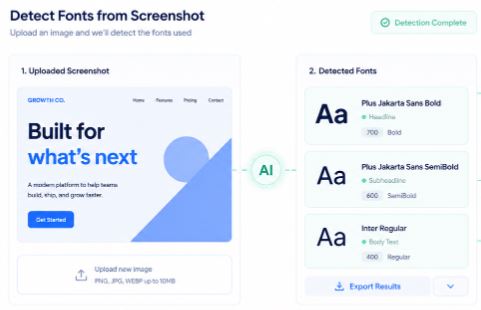
To find web font styles from an image, upload a screenshot containing the text to an AI-powered font finder like Find Font AI. The tool analyzes letter shapes, spacing, curves, and typography patterns to identify matching or similar fonts in seconds.
There’s a very specific kind of frustration that only designers, developers, marketers, and curious internet people understand.
You see a perfect font on a website. Maybe it’s in a landing page headline. Maybe it’s hidden inside a product ad that somehow feels more expensive because the typography is sharp and confident. Suddenly you need that font. Not tomorrow. Right now.
So you inspect the page.
Nothing obvious.
You zoom in.
Still nothing.
Then begins the spiral: browser extensions, guessing games, endless font galleries that somehow all look almost identical. Helvetica pretending to be Inter. Inter pretending to be SF Pro. A geometric sans trying desperately to impersonate another geometric sans.
And somewhere in the middle of that rabbit hole, you realize something strange.
Finding a web font should not feel like digital archaeology.
That’s exactly why tools like Find Font AI exist. Not to overwhelm you with typography theory. Not to turn font discovery into homework. Just to answer the question fast:
“What font is this?”
Oddly enough, that tiny question sits underneath branding, conversion rates, readability, trust, and even emotional perception online.
Fonts are not decoration anymore. They are interface psychology.
And once you notice that, you start seeing typography everywhere.
Why People Need to Find Web Font Styles
Most people do not wake up thinking about typography.
They wake up trying to finish a project.
A startup founder wants their homepage to feel “premium.” A developer wants consistency between a Figma mockup and production. A YouTube thumbnail designer wants stronger click-through rates. An ecommerce brand wants trust before the visitor even reads the first sentence.
Fonts quietly shape all of it.
According to typography research from the Nielsen Norman Group, readability and visual hierarchy strongly influence how users perceive credibility online.
That sounds technical until you experience it yourself.
Open two identical websites with different fonts. One feels polished. The other feels accidental.
Same content. Different emotional reaction.
That is why people constantly search for ways to find web font styles from screenshots, website images, logos, banners, PDFs, or even social media posts.
Not because fonts are trendy.
Because fonts change perception before words even begin.
The Old Way of Finding Fonts Was Weirdly Exhausting
For years, identifying fonts meant stitching together partial clues like a detective working with blurry evidence.
You would:
- Inspect source code
- Search CSS manually
- Compare letters one by one
- Browse giant font libraries
- Ask strangers in design forums
- Hope someone recognized the lowercase “g”
Sometimes it worked.
Often it didn’t.
Especially because modern websites rarely use simple typography stacks anymore. Variable fonts, modified glyphs, custom kerning, compressed spacing, SVG text rendering, everything became layered and messy.
And screenshots made it worse.
A compressed JPEG can distort typography enough to confuse traditional systems completely.
That’s where AI-based image analysis changed the experience.
Instead of matching fonts by simplistic rules, modern systems analyze visual patterns more like humans do: curves, stroke contrast, character width, terminal endings, spacing rhythm, and letter relationships.
In simple terms, the tool stops reading text as code and starts reading typography as shape.
That difference matters.
How AI Helps You Find Web Font Styles Faster
At first, I assumed AI font detection was probably exaggerated marketing.
Then I uploaded a blurry cropped screenshot into Find Font AI and watched it identify the typography almost instantly.
That moment felt strangely revealing.
The system was not “reading words.” It was interpreting design DNA.
The Process Is Surprisingly Simple
Step 1: Upload an Image
This can be:
- A website screenshot
- A social media graphic
- A logo
- A mobile app interface
- A PDF snippet
- An advertisement
- A YouTube thumbnail
Even imperfect screenshots can work because AI focuses on visual structures rather than exact pixels.
Step 2: AI Analyzes Typography Patterns
The engine scans:
- Letterforms
- Weight distribution
- Character spacing
- Curvature
- Serif construction
- Alignment behavior
- Visual rhythm
This is where modern font detection becomes dramatically more accurate than old comparison systems.
Step 3: Matching Fonts Appear
Instead of one uncertain guess, you usually receive:
- Exact font matches
- Near-identical alternatives
- Similar web-safe options
- Visually compatible replacements
That last part matters more than people realize.
Sometimes you do not actually need the exact font. You need the same emotional effect.
Those are different goals.
What Makes Web Fonts Difficult to Identify
Here’s the contradiction most people never hear:
Popular fonts are often harder to identify than obscure ones.
Why?
Because modern digital typography converges around similar aesthetics.
Minimalist sans-serif fonts dominate the internet right now. And many are intentionally designed to feel neutral, clean, and interchangeable.
That creates visual overlap.
For example:
- Inter
- Manrope
- SF Pro
- Helvetica Now
- Plus Jakarta Sans
- General Sans
To untrained eyes, they blur together.
But AI can detect microscopic differences in:
- aperture width
- tail angles
- x-height ratios
- terminal cuts
- bowl geometry
Tiny details. Huge accuracy improvements.
According to MIT Typography Research, subtle typography changes can significantly affect readability and cognitive processing speed in digital interfaces.
Fonts are not passive visuals.
They influence behavior.
Find Web Font Styles From Real-World Examples
Finding Fonts From Startup Websites
Modern SaaS websites obsess over typography because clean type communicates trust and simplicity.
If you upload a startup landing page screenshot into Find Font AI, you can quickly identify:
- headline fonts
- CTA typography
- dashboard UI text
- navigation styles
This helps developers recreate consistent design systems faster.
Finding Fonts From Logos
Logo typography introduces another layer of complexity because many brands customize fonts heavily.
Sometimes the font is:
- modified
- stretched
- manually kerned
- partially redrawn
AI still helps by identifying the closest base structure.
That saves hours of guessing.
Finding Fonts From Social Media Graphics
Instagram and YouTube design trends evolve absurdly fast.
A font that dominates thumbnails today may disappear six months later.
Creators constantly reverse-engineer typography styles to understand why certain visuals feel more clickable or modern.
And honestly, this part fascinates me.
People think virality comes from algorithms alone. But typography quietly shapes emotional first impressions before viewers consciously process anything else.
Why Designers Obsess Over Typography
At some point, fonts stop feeling like software assets and start feeling psychological.
A sharp grotesk font can feel authoritative.
Rounded sans-serifs feel approachable.
High-contrast serifs feel luxurious.
Monospaced fonts feel technical or intellectual.
Typography creates emotional weather.
And once brands understand that, they become incredibly intentional about font selection.
That explains why so many people search ways to find web font styles from images instead of randomly choosing fonts themselves.
They are not copying aesthetics blindly.
They are studying emotional communication systems.
The Hidden Problem With Font Guessing
Here’s something that surprised me after watching teams work on branding projects:
Most design time is not spent creating.
It is spent doubting.
“Is this the same font?”
“Does this feel close enough?”
“Why does ours look slightly off?”
“Why does their landing page feel more premium?”
Tiny typography mismatches create disproportionate emotional friction.
That uncertainty slows projects down.
AI font identification reduces that hesitation dramatically because it moves the conversation from vague instinct to visual confirmation.
That changes workflow momentum more than people expect.
Common Situations Where People Need to Find Web Font
Recreating a Brand Style
Agencies often receive incomplete assets from clients.
Maybe only screenshots exist.
Instead of rebuilding typography manually, AI detection accelerates the process.
Matching Existing Design Systems
Developers inheriting old projects often struggle identifying frontend typography stacks.
A screenshot-based font finder simplifies migration and redesign work.
Discovering Modern Typography Trends
Designers study competitor typography constantly.
Not to clone.
To understand evolving visual language.
Recovering Lost Fonts
Sometimes the original font files disappear entirely.
An image may be the only surviving reference.
That happens more often than expected.
Traditional Font Identification vs AI Detection
| Method | Speed | Accuracy | Effort Required |
| Manual Comparison | Slow | Medium | High |
| Browser Inspection | Medium | Medium | Technical |
| Design Forums | Unpredictable | Variable | Time-Consuming |
| AI Image Detection | Fast | High | Very Low |
The shift is not just about convenience.
It changes creative momentum.
That matters more than most software features ever do.
Why Screenshots Became the New Design Language
Ten years ago, people shared links.
Now they share screenshots.
That subtle shift changed how typography gets discovered online.
Fonts now travel through:
- Pinterest boards
- TikTok edits
- YouTube thumbnails
- Instagram carousels
- SaaS landing page screenshots
- Dribbble uploads
- AI-generated mockups
Which means typography increasingly exists outside inspectable code.
Image-based font finding became necessary because the internet itself became more visual.
That feels obvious in hindsight.
But it quietly transformed design workflows.
The Strange Emotional Side of Fonts
This part sounds dramatic until you notice it yourself.
Fonts carry memory.
A serif headline can remind someone of newspapers from childhood. A clean geometric sans may trigger associations with modern tech brands. Script fonts can feel personal or nostalgic depending on context.
Typography works like ambient storytelling.
Most users never consciously analyze it.
They just feel it.
That is why finding the right font matters so much more than aesthetics alone.
How to Improve Font Detection Accuracy
Even advanced AI tools work better with cleaner inputs.
Best Practices
Use High-Resolution Screenshots
Sharper text improves pattern recognition significantly.
Crop Around the Text
Remove unnecessary visual clutter whenever possible.
Avoid Extreme Distortion
Perspective-heavy images reduce accuracy.
Include Multiple Letters
More character variety creates stronger identification confidence.
Simple adjustments dramatically improve results.
Why Find Font AI Feels Different

Most font tools feel built for databases.
Find Font AI feels built for real people in the middle of creative work.
That distinction matters.
You upload an image because you are trying to solve momentum friction:
- a delayed project
- an incomplete brand file
- a missing font name
- an inconsistent design
- a typography mystery
The tool removes interruption.
That sounds small until you realize modern creative work depends heavily on uninterrupted flow states.
A five-minute interruption can fracture an entire design session.
Fast font discovery protects momentum.
And honestly, that might be the most underrated feature of all.
FAQ About Find Web Font
What does “find web font” mean?
It means identifying the font used on a website, image, screenshot, logo, or digital design.
Can I find web font from an image?
Yes. AI-powered tools like Find Font AI analyze uploaded screenshots and detect matching fonts automatically.
Does font detection work with blurry screenshots?
Moderately blurry images can still work because AI analyzes overall typography structure, not just perfect pixels.
Can AI identify custom fonts?
Sometimes. If a font is heavily customized, the tool usually suggests the closest matching base font.
Why do fonts look different on websites?
Web typography changes based on rendering engines, variable font settings, spacing, browser behavior, and CSS styling.
Key Takings
- Finding web font styles manually is often frustrating and time-consuming.
- AI-powered image analysis dramatically improves font detection accuracy.
- Typography shapes trust, readability, and emotional perception online.
- Screenshots became the modern source of font discovery across the internet.
- Find Font AI helps users identify fonts from uploaded images within seconds.
- Clean screenshots with multiple visible letters improve matching accuracy.
- Fonts are not just visual choices. They influence how digital experiences feel.