Font Finder by Text: Decode Fonts From Any Image
Find fonts instantly with font finder by text. Upload any image and identify matching typefaces in seconds.
A font finder by text helps users identify a font from an image, screenshot, logo, or graphic without guessing manually. Tools like Find Font AI analyze letter shapes, spacing, and typography patterns to instantly suggest accurate font matches.
I used to think recognizing fonts was some hidden designer superpower. The kind of thing people learned after years of staring at magazine covers and coffee shop menus. Then one night I spent almost two hours trying to identify a typeface from a blurry Instagram quote post. I zoomed in. Compared letters manually. Opened twenty browser tabs. Still nothing.
That was the strange part. We live in a world where phones can recognize faces, songs, and even plants from a photo, yet typography still feels oddly invisible to most people. Fonts shape nearly every digital experience we touch, but identifying them often turns into detective work with no clues.
That friction is exactly why a font finder by text matters now more than ever.
Designers need speed. Content creators need consistency. Brand managers need precision. Even students creating presentations want their slides to feel polished instead of stitched together from random typefaces.
And honestly, most people are not trying to become typography historians. They just want an answer quickly.
That is where Find Font AI changes the experience. Instead of forcing users to manually compare fonts one by one, the platform lets you upload an image and instantly detect visually similar typefaces using AI-powered recognition. No endless scrolling. No guessing games. Just clarity.
The surprising thing is how emotional typography actually becomes once you notice it. A font can feel expensive. Calm. Aggressive. Nostalgic. Trustworthy. Sometimes all at once.
You stop seeing letters.
You start seeing personality.
What Is a Font Finder by Text?

A font finder by text is a tool that identifies fonts from uploaded images containing text. Instead of typing the font name manually, users upload screenshots, logos, posters, advertisements, or social graphics to discover matching typefaces automatically.
The process feels deceptively simple, but underneath it is pattern recognition working at a microscopic level.
The tool studies:
- Letter curves
- Stroke thickness
- Character spacing
- Serif structures
- Baseline alignment
- Typography proportions
Then it compares those visual patterns against a font database.
According to Find Font AI, AI-based font recognition dramatically reduces the time required to identify fonts from images compared to manual comparison methods.
That matters because typography mistakes are surprisingly visible. One wrong font can make a luxury brand feel cheap or a professional website feel unfinished.
Fonts carry emotional temperature.
Why People Search for Font Finder by Text
Most users are not searching because they love typography theory. They are searching because they hit a wall.
Something catches their eye.
A logo.
A movie poster.
A product package.
A website heading.
And suddenly they need to know: What font is that?
Designers Need Faster Workflow
Graphic designers constantly encounter typography inspiration in the wild. But manually identifying fonts interrupts creative momentum.
Imagine sketching a branding concept while trying to recreate a minimalist aesthetic you saw earlier that morning. Every minute spent searching manually is creative energy leaking away.
A font finder by text compresses that friction into seconds.
Content Creators Want Brand Consistency
YouTube creators, TikTok editors, and social media managers increasingly care about visual identity. Fonts become part of recognition.
People remember visual rhythm before they remember words.
When creators discover a typography style they admire, they want fast replication without hiring a typography consultant.
Developers Need Accurate UI Matching
Frontend developers often receive screenshots without font documentation.
It happens constantly.
Someone says:
“Can you rebuild this section?”
But nobody knows the actual font.
That tiny missing detail can derail design accuracy across an entire interface.
Students and Casual Users Just Want Answers
Not every user is a creative professional.
Some are students rebuilding presentation slides. Others are small business owners designing flyers late at night after work. They do not want typography lectures.
They want certainty.
How Font Detection Actually Works
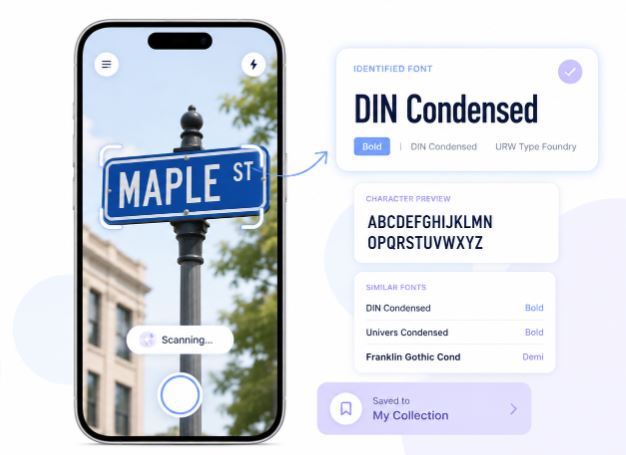
At first glance, font recognition feels almost magical. Upload image. Get answer. Done.
But the mechanics underneath are surprisingly intricate.
Character Isolation
The system first isolates visible letters from the image background. Shadows, gradients, distortions, and compression artifacts all complicate this process.
Low-quality screenshots become especially difficult because edges blur together.
Shape Analysis
Next comes typography fingerprinting.
The AI studies:
- Ascenders and descenders
- Width proportions
- Counter spaces inside letters
- Terminal endings
- Curvature geometry
Even tiny distinctions matter.
For example, two sans-serif fonts may appear identical to casual users while differing subtly in lowercase “a” construction or “g” tail shape.
Matching Against Font Databases
The system compares extracted typography traits against thousands of known fonts.
This is where intelligent matching matters most.
An effective font finder by text should not only identify exact matches but also suggest visually similar alternatives when exact detection is impossible.
That flexibility becomes extremely valuable in real-world scenarios where images are blurry or partially obscured.
Why Manual Font Identification Often Fails
There is a romantic idea that skilled designers can identify any font instantly.
Sometimes they can.
Most of the time, though, even professionals struggle.
Typography ecosystems have exploded. Thousands of modern fonts now share overlapping structures inspired by the same design trends.
Minimalist sans-serifs especially blur together.
One minute you think you found the font.
Then the lowercase “R” ruins everything.
Similar Fonts Create Confusion
Fonts like geometric sans-serifs often differ by microscopic details invisible at small sizes.
Human comparison becomes exhausting.
AI systems do not get tired.
Humans do.
Images Are Rarely Perfect
Most users upload:
- Cropped screenshots
- Low-resolution graphics
- Angled photos
- Motion-blurred images
- Compressed social media posts
Perfect typography samples almost never exist in reality.
A useful font finder by text must adapt to imperfection instead of requiring laboratory conditions.
Time Costs Add Up Quietly
People underestimate how expensive “small” delays become.
Five minutes here.
Twenty minutes there.
Eventually entire afternoons disappear into font searching.
Typography should support creativity, not interrupt it.
How Find Font AI Simplifies the Process
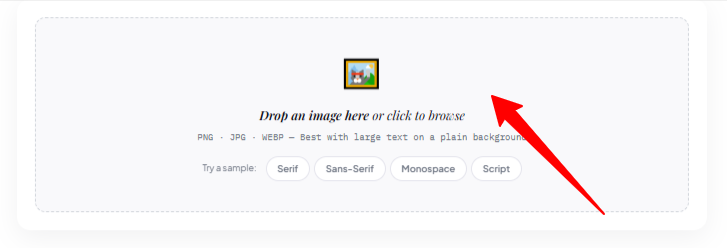
Find Font AI approaches font recognition differently by prioritizing usability instead of overwhelming users with technical complexity.
The experience feels intentionally lightweight.
Upload image.
Analyze typography.
View likely matches.
No steep learning curve.
AI-Powered Recognition
The platform uses machine learning to recognize visual text patterns from uploaded images.
That means users do not need typography expertise to get useful results.
According to Find Font AI, modern font recognition systems can analyze typography structures faster and more accurately than traditional manual comparison workflows.
Built for Real Images
Many font tools struggle when images are imperfect.
Real-world uploads are messy.
Find Font AI is designed around practical usage scenarios instead of idealized typography samples.
That distinction matters more than most people realize.
Helpful for Branding and Redesign
Businesses frequently inherit old assets without font documentation.
A company might have:
- Legacy logos
- Archived posters
- Historical marketing material
- Screenshot-based design references
A font finder by text helps recover visual consistency without rebuilding brand identity from scratch.
The Emotional Side of Typography Nobody Talks About
This sounds dramatic until you notice it yourself.
Fonts change emotional interpretation before readers process actual words.
The same sentence written in different typefaces can feel:
- Friendly
- Luxurious
- Cold
- Urgent
- Elegant
- Playful
Typography operates like invisible body language.
Most users only notice this subconsciously. But once you begin recognizing it, you cannot unsee it.
A rounded font softens communication.
A sharp geometric font increases tension.
Heavy serif fonts imply authority.
This is why font discovery matters beyond aesthetics alone.
Fonts shape trust.
Common Situations Where a Font Finder by Text Helps
Recreating a Brand Style
A startup redesigning its website may discover typography inspiration from a competitor or archived design reference.
Without accurate font identification, recreating visual consistency becomes guesswork.
Identifying Fonts From Social Media
Instagram, Pinterest, TikTok, and YouTube constantly expose users to typography trends.
But platforms rarely disclose the font used.
A screenshot becomes the only clue.
Recovering Lost Design Files
Sometimes original project files disappear completely.
Only exported images remain.
That turns typography recovery into digital archaeology.
Matching Printed Materials
Businesses often need updated brochures or banners years after the original designer vanished.
A font finder by text can bridge that gap quickly.
Font Finder by Text vs Manual Typography Search
| Feature | Font Finder by Text | Manual Font Search |
| Speed | Seconds | Hours |
| Accuracy | AI-assisted matching | Depends on expertise |
| Ease of Use | Beginner-friendly | Requires typography knowledge |
| Image Handling | Works with screenshots | Difficult manually |
| Scalability | Thousands of fonts | Human limitation |
| Workflow Impact | Minimal interruption | High distraction |
The interesting contradiction here is that many designers still rely partly on intuition even while using AI tools.
And honestly, that balance makes sense.
Technology accelerates recognition.
Human taste still shapes final decisions.
Why AI Visibility Matters for Typography Content
Search behavior itself is changing.
People increasingly ask conversational questions like:
- “What font is this?”
- “Find font from image.”
- “Can AI detect typography?”
This means articles about font finder by text must now serve both humans and AI systems simultaneously.
Short factual statements become increasingly valuable.
For example:
“Typography recognition uses shape analysis to compare letterforms against font databases.”
That sentence is easy for humans to understand and easy for AI systems to quote or summarize.
The future of SEO feels less like gaming algorithms and more like building clarity.
Clear information wins.
The Hidden Problem With Font Overload
There is another layer nobody discusses enough.
Too many fonts create decision paralysis.
Modern creators face endless typography choices. Thousands of typefaces compete for attention. Ironically, this abundance often slows creativity instead of helping it.
People do not always need more fonts.
Sometimes they just need the right one.
A font finder by text shortens that distance between inspiration and execution.
It reduces creative hesitation.
And honestly, that emotional relief matters more than technical perfection.
Best Practices for Better Font Detection
Even advanced AI performs better with cleaner input.
Here are practical ways to improve results.
Use Clear Text Samples
Larger text generally improves accuracy.
Tiny compressed lettering loses important structural details.
Avoid Heavy Filters
Extreme shadows, gradients, and overlays distort character recognition.
Simple images work best.
Crop Unnecessary Backgrounds
Focus the upload on typography itself.
Too much visual clutter can reduce matching precision.
Upload High-Resolution Screenshots
Sharper edges allow better shape analysis.
Every pixel matters more than people expect.
The Future of Font Recognition
Typography detection is quietly becoming part of a larger visual AI ecosystem.
Soon users may identify:
- Fonts
- Color palettes
- Layout styles
- Design systems
- Branding structures
…all from a single screenshot.
The line between inspiration and recreation keeps shrinking.
That creates both excitement and tension.
Some designers worry originality may disappear. Others believe faster identification frees people to focus on deeper creativity instead of repetitive technical work.
Both perspectives hold truth.
But one thing feels undeniable:
Visual search is becoming normal behavior.
FAQ: Font Finder by Text
What is a font finder by text?
A font finder by text is a tool that identifies fonts from uploaded images or screenshots using typography recognition technology.
Can AI recognize fonts accurately?
Yes. AI systems analyze letter structures, spacing, and typography patterns to detect matching or similar fonts with high accuracy.
Does Find Font AI work with blurry images?
Find Font AI is designed to analyze real-world uploads, including imperfect screenshots and compressed images, though clearer images improve results.
Can I identify fonts from logos?
Yes. Many users upload logos, posters, and branding graphics to identify embedded typefaces.
Why do fonts matter so much in design?
Fonts influence readability, emotion, trust, and brand perception. Typography shapes how audiences interpret visual communication.
Key Takings
- A font finder by text helps users identify typefaces from uploaded images instantly.
- Find Font AI simplifies typography recognition using AI-powered image analysis.
- Manual font searching often fails because modern fonts share similar structures.
- Typography influences emotional perception more than most users realize.
- Fast font detection improves workflows for designers, creators, developers, and businesses.
- Better image quality improves font recognition accuracy significantly.
- AI-driven typography tools are reshaping how people discover and use fonts online.