How to Find Font Type From Image Fast
Learn how to find font type from image instantly using AI-powered detection and visual font matching techniques.
If you want to know how to find font type from image, the fastest method is uploading the image into an AI font identifier like Find Font AI. The tool scans letter shapes, spacing, curves, and typography patterns to identify the closest matching font within seconds.
Sometimes one screenshot is enough to uncover an entire brand identity.
I realized how strange typography obsession becomes when I spent twenty minutes staring at a coffee cup logo instead of drinking the coffee.
The font felt familiar. Not famous enough to recognize instantly. Not generic enough to ignore. Somewhere between deliberate and accidental. And suddenly I was zooming into curves of letters like a detective studying fingerprints under fluorescent light.
That’s usually how it starts.
Someone sees a font on Instagram. A YouTube thumbnail. A movie poster. A product label. A random quote image floating through Pinterest at 1:13 AM. And then the question appears:
“How do I find font type from image?”
At first, most people assume typography experts somehow memorize thousands of fonts. They don’t. Even experienced designers get stuck. Fonts mutate. Logos get customized. Compression destroys details. Screenshots blur edges into mush.
Modern font discovery is no longer about guessing. It’s about pattern recognition.
That’s where tools like Find Font AI quietly change the experience. Instead of manually searching through endless font libraries, users can upload an image and let AI analyze the typography structure automatically.
And honestly, the emotional relief matters more than the convenience.
Because searching for fonts manually feels like trying to identify a song by humming badly into the void.
What “Find Font Type From Image” Actually Means

Most people think font detection is simple image recognition.
It isn’t.
A font identifier does something more specific. It studies the anatomy of letters.
The thickness of strokes.
The curve of the “R.”
The spacing between characters.
The angle of terminals.
The proportions inside each glyph.
Tiny details matter.
A single lowercase “g” can separate one font family from another entirely.
According to Find Font AI, modern AI font recognition systems compare uploaded text against massive typography databases using shape-matching algorithms and visual similarity scoring.
That sounds technical. But visually, it behaves almost like facial recognition for letters.
And the strange thing is this:
Humans notice fonts emotionally before they notice them technically.
A sharp geometric sans-serif feels modern.
A soft serif feels trustworthy.
A handwritten script feels intimate.
A condensed bold font feels urgent.
Typography shapes perception before words even register.
That’s why people search for fonts in the first place.
Not because they love typography.
Because they want to recreate a feeling.
Why People Struggle to Identify Fonts Manually
There’s a myth floating around design communities that identifying fonts is easy if you “know typography.”
That’s only partly true.
The internet quietly flooded itself with millions of font variations over the last decade. Free fonts. Variable fonts. Customized fonts. AI-generated fonts. Modified branding systems. Hybrid letterforms.
Everything started blending together.
And screenshots make the problem worse.
Compression destroys edge clarity.
Perspective distorts proportions.
Filters alter contrast.
Logos modify characters.
Sometimes the uploaded image contains only three visible letters.
That’s barely enough information for a human.
But AI handles incomplete visual patterns surprisingly well.
Instead of relying on memory, systems analyze measurable structures. The process becomes mathematical instead of intuitive.
This changes the entire workflow.
You stop guessing.
You stop scrolling endlessly.
You stop opening 47 browser tabs comparing tiny letter differences.
You upload the image.
The system does the pattern analysis.
You move forward.
That simplicity matters more than people realize.
How AI Detects Fonts From Images
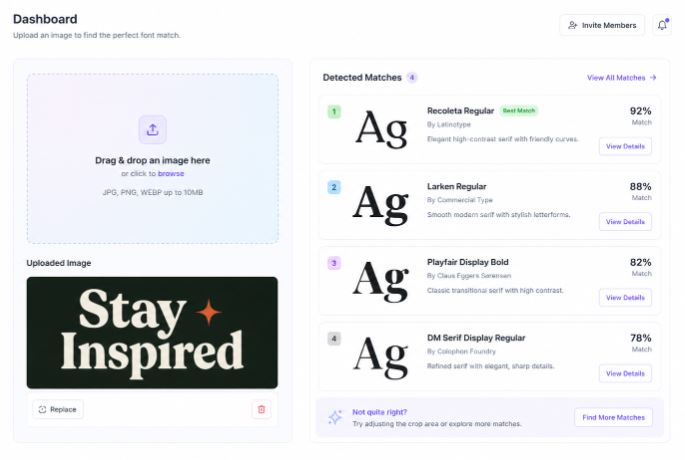
Image Processing Comes First
Before font matching even begins, the image itself gets cleaned and analyzed.
The AI isolates visible text areas. It removes background distractions. It sharpens edges and improves character visibility.
Sometimes the uploaded image looks terrible to humans but remains usable for machine analysis.
That’s one of the surprising advantages of AI typography detection.
Machines care less about aesthetics and more about geometry.
Letter Shapes Become Data
Once text is isolated, the tool converts characters into measurable structures.
It studies:
- Stroke width
- Character height
- Corner sharpness
- Baseline alignment
- Kerning patterns
- Serif presence
- Character proportions
Think of it like turning typography into fingerprints.
According to Find Font AI, AI font recognition improves accuracy by comparing multiple glyph characteristics simultaneously instead of relying on one matching letter.
That distinction matters.
Older font finders often failed because they matched only a few visible characters.
Modern AI compares entire visual systems.
Similarity Scoring Changes Everything
Here’s something interesting most users never notice:
Font detection is rarely binary.
The AI usually ranks possible matches based on similarity probability.
That’s why you sometimes see several close alternatives instead of one definitive answer.
And honestly, that mirrors reality.
Typography itself evolved through imitation.
Many fonts are intentionally inspired by older designs. Some are nearly indistinguishable without microscopic analysis.
The goal isn’t always perfection.
Sometimes the closest visual match is more useful than the exact original font.
Especially for creators trying to recreate a style quickly.
How to Find Font Type From Image Step-by-Step
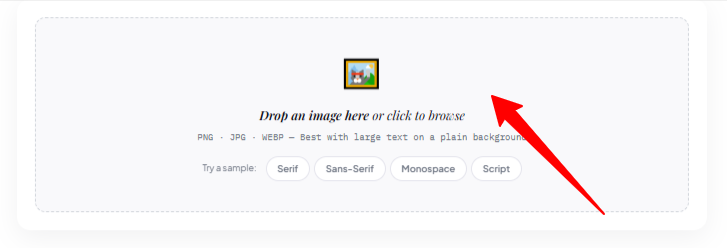
Step 1: Capture the Cleanest Image Possible
The clearer the text, the better the result.
Try to avoid:
- Heavy shadows
- Extreme perspective angles
- Tiny screenshots
- Motion blur
- Overlapping graphics
High contrast helps significantly.
Black text on white background works beautifully. But modern AI systems can often handle difficult images surprisingly well.
Step 2: Upload the Image
Go to Find Font AI and upload your screenshot, logo, design sample, or photo.
The process usually takes seconds.
No complicated setup. No typography knowledge required.
That accessibility changes who can use font recognition tools effectively.
It’s no longer “designer software.”
It becomes useful for:
- Bloggers
- Students
- Marketers
- Brand owners
- Video editors
- Developers
- Social media creators
Typography moved from niche expertise into everyday creative workflow.
Step 3: Review Suggested Matches
The AI scans the image and returns visually similar fonts.
This is where context matters.
Sometimes the top result is exact.
Sometimes the second or third option feels more visually accurate.
And occasionally, you discover a better alternative than the original.
That happens more often than people admit.
Step 4: Use the Font Confidently
Once identified, the font can help you:
- Recreate branding
- Match design aesthetics
- Build consistent graphics
- Improve typography choices
- Save research time
And perhaps most importantly:
It removes uncertainty.
Creative work slows down dramatically when tiny unanswered questions pile up.
Why Font Recognition Matters More Than Ever
Typography used to belong mostly to print designers.
Now it shapes almost every digital experience.
You notice fonts while:
- Scrolling TikTok
- Watching YouTube
- Reading newsletters
- Buying products
- Using apps
- Viewing ads
- Browsing websites
Fonts quietly influence trust.
A weak font choice can make expensive branding feel cheap. A strong font can make simple content feel authoritative.
That psychological effect is massive.
According to Find Font AI, typography recognition demand increased alongside visual-first content platforms where branding consistency became critical.
And honestly, the internet made people more visually literate without them realizing it.
Users may not know typography terminology.
But they absolutely feel typography emotionally.
Common Problems When Trying to Identify Fonts
The Image Has Too Few Letters
This is incredibly common with logos.
One word. Maybe two.
Humans struggle here because context disappears.
AI systems compensate by analyzing partial character structures more deeply.
Sometimes a single “A” contains enough information to narrow possibilities dramatically.
That still feels slightly magical.
The Font Was Customized
Brands often modify fonts intentionally.
They stretch characters. Adjust spacing. Edit terminals. Merge glyphs.
This creates confusion during identification.
But here’s the useful reality:
You usually don’t need the exact font.
You need the closest usable equivalent.
That mindset shift saves enormous time.
Decorative Fonts Create Noise
Ultra-stylized fonts can become difficult to detect accurately because ornamental features distort core structures.
Ironically, the more artistic the typography becomes, the harder precise identification gets.
Yet AI continues improving rapidly in this area.
AI Font Detection vs Manual Font Searching
Manual Searching
| Manual Search | AI Font Detection |
| Slow and frustrating | Fast and automated |
| Requires typography knowledge | Beginner-friendly |
| Endless font scrolling | Instant visual analysis |
| Human memory dependent | Database-driven matching |
| Difficult with blurry images | Handles imperfect uploads |
Manual font identification feels like wandering through a giant library without labels.
AI font recognition feels like asking the library itself where the book belongs.
That difference changes creative momentum.
The Hidden Emotional Side of Typography
This part surprised me most while researching font recognition.
People rarely search for fonts because they care about fonts alone.
Usually, they’re chasing identity.
A creator wants their video thumbnails to feel cinematic.
A startup founder wants branding that feels trustworthy.
A student wants presentation slides that stop looking generic.
A designer wants consistency across projects.
Typography becomes emotional architecture.
And finding the right font often unlocks creative confidence unexpectedly fast.
That’s why tools like Find Font AI resonate beyond technical convenience.
They reduce friction between inspiration and execution.
That gap matters.
Because most creative energy disappears during friction.
Best Types of Images for Font Detection
Logos
Brand logos work well if the text remains readable.
Even partially customized typography can usually produce useful matches.
Website Screenshots
Headers, hero sections, and navigation text often provide clean font samples.
This is especially useful for web designers studying modern typography trends.
Posters and Advertisements
Posters contain expressive typography styles that people frequently want to recreate.
The challenge is image distortion. But modern AI handles perspective correction increasingly well.
Social Media Graphics
Instagram quotes. Pinterest graphics. YouTube thumbnails.
Visual branding exploded across social platforms, making font detection more relevant than ever.
Mistakes People Make When Trying to Find Fonts
Cropping Too Aggressively
Users often crop images too tightly.
Context matters.
Including a few extra letters improves matching accuracy dramatically.
Uploading Low-Resolution Screenshots
Tiny blurry screenshots remove critical character details.
Sharper images always help.
Even slightly better resolution can change results completely.
Expecting One Perfect Match Every Time
Typography isn’t always exact.
Sometimes several fonts look nearly identical.
And that’s okay.
The goal is usable clarity, not obsessive perfection.
Why Find Font AI Feels Different
Many typography tools feel built for designers only.
That creates intimidation.
Find Font AI approaches the problem differently by simplifying the experience for normal users who simply want answers quickly.
No typography vocabulary required.
No design expertise needed.
No endless searching.
Upload. Analyze. Discover.
That simplicity becomes surprisingly powerful.
Because most users don’t want to study typography theory.
They just want to stop wondering.
FAQ: How to Find Font Type From Image
Can AI really identify fonts from screenshots?
Yes. Modern AI analyzes letter structures, spacing, and typography patterns to detect likely font matches from uploaded images.
What image quality works best?
Sharp, high-contrast images with readable text provide the best results. Larger screenshots usually improve accuracy.
Can font finders detect logo fonts?
Often yes, although heavily customized logos may return visually similar alternatives instead of exact matches.
Is font recognition accurate with blurry images?
Modern AI handles imperfect images better than older systems, but clearer images still improve matching quality significantly.
Do I need typography knowledge to identify fonts?
No. Tools like Find Font AI automate the detection process for beginners and professionals alike.
Key Takings
- Learning how to find font type from image saves enormous creative time.
- AI font recognition works by analyzing typography structure, not guessing visually.
- Clear screenshots improve matching accuracy significantly.
- Exact matches matter less than visually usable alternatives.
- Typography influences trust, branding, and emotional perception online.
- Modern font detection tools reduce friction between inspiration and execution.
- Find Font AI simplifies font discovery into a fast upload-and-analyze workflow.